Checkbox Field
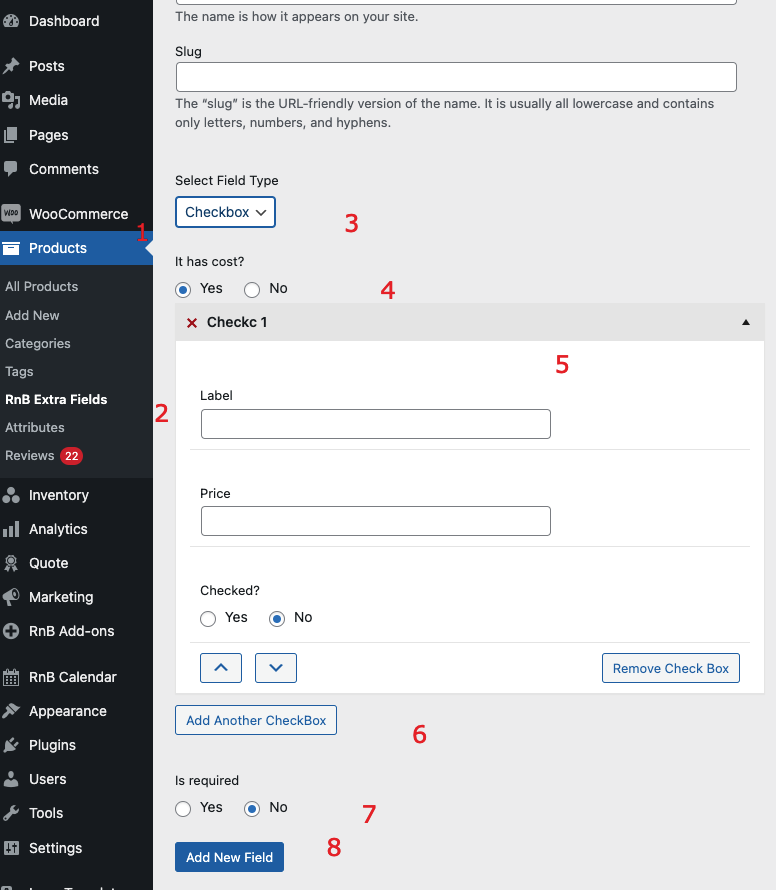
- Description: Identifies the field as label.
- Requirement: Can be any descriptive title.
- Description: Fills automatically upon creation of the field used for internal referencing.
- Requirement: Optional, can be left blank.
- Description: A dropdown list of available fields type.
- Requirement: Choosing a field is mandatory.
- Description: The field lets you choose between two options:
yes or no. This choice determines whether the field is free or incurs a cost.
- Requirement: Choosing a field is mandatory.
- Description: A repeating field that will be shown in the dropdown.
- Requirement: Choosing a field is mandatory.
- Description: The field lets you choose between two options:
yes or no.
- Requirement: Choosing a field is mandatory.